Unity Multiplayer Game Development: Cost, Features, Backend, and Challenges
Key Takeaways
- Strategic Value: Unity multiplayer combines engaging gameplay with scalable backend systems, improving retention, performance, and player trust across platforms.
- Service Scope: Multiplayer development includes gameplay, networking, backend architecture, matchmaking, analytics, and LiveOps for stable launches and long-term growth.
- Growth Benefits: Multiplayer features boost engagement, session time, and lifetime value while reducing churn through competition, social play, and live updates.
- Use Scenarios: Unity multiplayer fits mobile games, PvP, co-op, turn-based strategy, cross-platform titles, and large-scale online experiences.
- Emerging Trends: Future multiplayer games focus on cross-platform play, server authority, LiveOps depth, and data-driven updates powered by scalable cloud systems.
Introduction
Multiplayer games do not have to be massive combat royales anymore. Multiplayer has become a major engagement driver across casual card games, racing titles, sports games, cooperative puzzles, and farming simulations. This shift has increased demand for unity multiplayer game development among studios, startups, and independent developers that want stronger retention and longer player lifecycles.
Many studios prefer working with a specialized Unity game development company to avoid networking, backend, and scalability pitfalls.
When players can cooperate, compete, or share a live gaming environment, they stay longer. But visuals and mechanics are rarely the reason multiplayer games fail. Most failures come from poor backend planning, unstable networking, or insufficient scalability. This blog explains what Unity multiplayer game development really means, including features, backend architecture, cost, timelines, and the challenges teams must solve to build online games that last.
What Is Unity Multiplayer Game Development?
Unity multiplayer game development is the process of building games where multiple players participate in shared game sessions through local or online networking solutions. Instead of each player experiencing the game alone, actions are synced through servers or peer connections so gameplay feels responsive and fair across devices.
This development method supports turn-based gaming, where actions happen in sequence, and real-time multiplayer, where players cooperate or compete at the same time. It also supports co-op multiplayer, player-versus-player modes, asynchronous features such as leaderboards and challenges, and cross-platform multiplayer across mobile, PC, console, and web environments.
For broader production planning, our game development services cover gameplay design, art, engineering, QA, and launch support.
Why Choose Unity for Multiplayer Game Development?
Unity lets teams build once and deploy to mobile, PC, console, augmented reality, virtual reality, and WebGL environments. This makes it easier to build multiplayer games quickly and scale them across platforms. Multiplayer projects often benefit from proven mobile game development experience, especially for casual, co-op, and PvP games.
With its large development community, robust C# scripting, and built-in networking features, teams can build, test, and scale multiplayer games without starting from scratch.
1. Cross-Platform Support
Unity helps teams share multiplayer codebases and publish to mobile, PC, console, AR, VR, and WebGL without rebuilding the entire system for each platform.
2. Large Developer Ecosystem
Unity has a global ecosystem of plugins, documentation, tutorials, experienced talent, and long-term support. This improves development speed, reliability, and maintenance outcomes.
3. Strong C# Scripting
C# scripting supports clean architecture, predictable behavior, easier debugging, scalable gameplay logic, and reliable multiplayer systems across platforms.
4. Multiplayer Networking Tools
Unity tools such as Netcode, Lobby, Relay, Matchmaker, Authentication, Cloud Code, and Analytics make networking sessions, player data management, and backend operations easier.
5. Mobile Casual Fit
Unity fits what today’s mobile casual multiplayer games need most: fast iteration, broad device coverage, good performance, balanced progression, and retention-focused design.
6. Faster MVP Development
Unity can help teams create an MVP faster than custom engines. This supports rapid prototyping, validation testing, and shorter iteration cycles.
Popular Types of Unity Multiplayer Games
Not all multiplayer games are built the same. Different types of games have different technical and business needs. The multiplayer format you choose defines backend architecture, networking complexity, development cost, and long-term scalability from the start.
1. Real-Time PvP Games
Fighting games, shooters, racing games, sports titles, and battle arenas fall into this category. These games need fast synchronization, server authority, and low latency. For visually rich multiplayer experiences, teams often combine networking with strong 3D game development capabilities.
2. Co-Op Multiplayer Games
Puzzle, adventure, party, survival, and mission-based cooperative games are slightly less strict than PvP titles, but they still require tight synchronization and clear session management.
3. Turn-Based Multiplayer Games
Chess, strategy games, card games, and board games are more backend-heavy but less demanding in real-time performance.
4. Asynchronous Multiplayer Games
Challenge-based mechanics, farming games, ghost racing, and leaderboards let players compete indirectly even without real-time communication. Casual and turn-based multiplayer titles are often paired with reliable HTML5 game development for browser-based reach.
5. MMO or Large-Scale Multiplayer Games
Large player counts, complex economies, and persistent universes demand advanced backend infrastructure and long-term LiveOps planning.
Core Features of a Unity Multiplayer Game
Core multiplayer features define how players connect, interact, compete, and return. They also determine backend complexity, long-term maintenance needs, and total development cost. A good feature set keeps gameplay smooth, stores data safely, and lets the game scale as player numbers grow.
| Feature |
Purpose |
| Player Authentication |
Secure login, guest access, and social login support. |
| Matchmaking |
Connect players by skill, region, game mode, or latency. |
| Lobby System |
Let players create, join, or invite others to rooms. |
| Real-Time Sync |
Synchronize player movement, actions, score, and game state. |
| Voice and Text Chat |
Enable clear communication between players. |
| Leaderboards |
Track rankings, scores, and competitive progress. |
| Friends and Invites |
Improve social retention and repeat sessions. |
| Anti-Cheat System |
Reduce hacks, exploits, and unfair gameplay. |
| Cloud Save |
Store player progress securely across devices. |
| Analytics |
Track retention, churn, engagement, and monetization. |
As multiplayer games get more competitive, these features become more complex. Each new system adds backend logic, server load, testing work, and maintenance needs.
Before launch, strong UI/UX design helps make lobbies, invites, chat, and matchmaking flows easier for players to understand.
Unity Multiplayer Backend Architecture
The backend is the heart of any multiplayer game. Cross-platform multiplayer success depends heavily on strong backend architecture and clean data handling. The backend manages game sessions, synchronizes players, saves progress securely, and scales when usage increases.
In Unity multiplayer projects, the backend connects the game client to servers that manage logic, statistics, player data, matchmaking, analytics, and monitoring. A typical setup includes the Unity client, game server, matchmaking server, authentication service, database, cloud storage, real-time networking layer, analytics tools, monitoring systems, and an admin interface for live control.
Many studios now combine multiplayer games with AI development to improve matchmaking, behavior analysis, bot detection, and personalization.
1. Peer-to-Peer Multiplayer
This strategy connects players directly with lower infrastructure cost. It can work for informal small-scale games, but it is less secure and less reliable.
2. Client-Server Multiplayer
A central server checks the game state and player actions. This is suitable for competitive multiplayer because it gives better control, scalability, and fairness.
3. Dedicated Game Server
Dedicated servers are used for high-performance real-time games such as battle arenas, PvP shooters, and racing games.
4. Serverless or Managed Backend
This approach works well for turn-based games, casual multiplayer, leaderboards, cloud saves, and lightweight matchmaking.
For custom backend logic, APIs, and real-time services, Node.js development is often useful for scalable multiplayer infrastructure.
Long-term player data, inventory, rankings, and analytics also require reliable database development from the beginning.
Unity Multiplayer Game Development Cost
The cost of building Unity multiplayer games is a major concern for founders and product teams. Pricing varies widely based on game complexity, platform coverage, backend requirements, art quality, and LiveOps scope. Here is a realistic cost breakdown to help align budget with product goals early.
Cost Breakdown by Game Type
| Game Type |
Estimated Cost |
Typical Metrics |
| Simple turn-based multiplayer game |
$10,000 to $25,000 |
2 to 4 players per match, basic backend, cloud save, and leaderboard. |
| Casual real-time multiplayer game |
$25,000 to $60,000 |
4 to 8 players per session, light matchmaking, and simple sync. |
| Mid-level PvP multiplayer game |
$60,000 to $120,000 |
8 to 16 players, skill-based matchmaking, and anti-cheat systems. |
| Cross-platform multiplayer game |
$80,000 to $180,000 |
Mobile plus PC or console, shared accounts, and cross-play. |
| MMO or large-scale multiplayer game |
$150,000 to $500,000+ |
50+ concurrent players, persistent world, and LiveOps. |
What Drives the Cost?
Development cost depends on build complexity and long-term operations. Game type affects gameplay logic and networking needs. The number of players per session directly affects server load. Real-time multiplayer requires stronger synchronization than turn-based systems.
Server architecture, matchmaking logic, hosting, and anti-cheat systems influence engineering effort. High-quality art, animations, and compatibility with WebGL, Android, iOS, PC, and console also increase production time. Ongoing costs include LiveOps, backend scalability, voice and text chat, anti-cheat tools, hosting, and service usage as traffic grows.
If Android is a key launch platform, expert Android app development support can reduce device-level performance and compatibility issues.
Development Timeline for a Unity Multiplayer Game
The development timeline for Unity multiplayer games varies by size, features, and technical complexity. Prototypes can move quickly, but full-scale multiplayer titles need deeper backend work, testing, optimization, and launch preparation. Realistic timelines help teams control costs, reduce rework, and set better launch expectations.
Timeline by Project Scope
| Project Scope |
Estimated Timeline |
| Multiplayer prototype |
2–4 weeks |
| Simple MVP |
6–10 weeks |
| Mid-level multiplayer game |
3–6 months |
| Cross-platform multiplayer game |
5–9 months |
| MMO or large-scale multiplayer |
9–18+ months |
Timelines are affected by gameplay complexity, backend architecture, multiplayer networking, testing cycles, balance tuning, and platform certification requirements for mobile, PC, and console releases.
For browser-first releases, web game development can help extend multiplayer access without forcing every player to download an app.
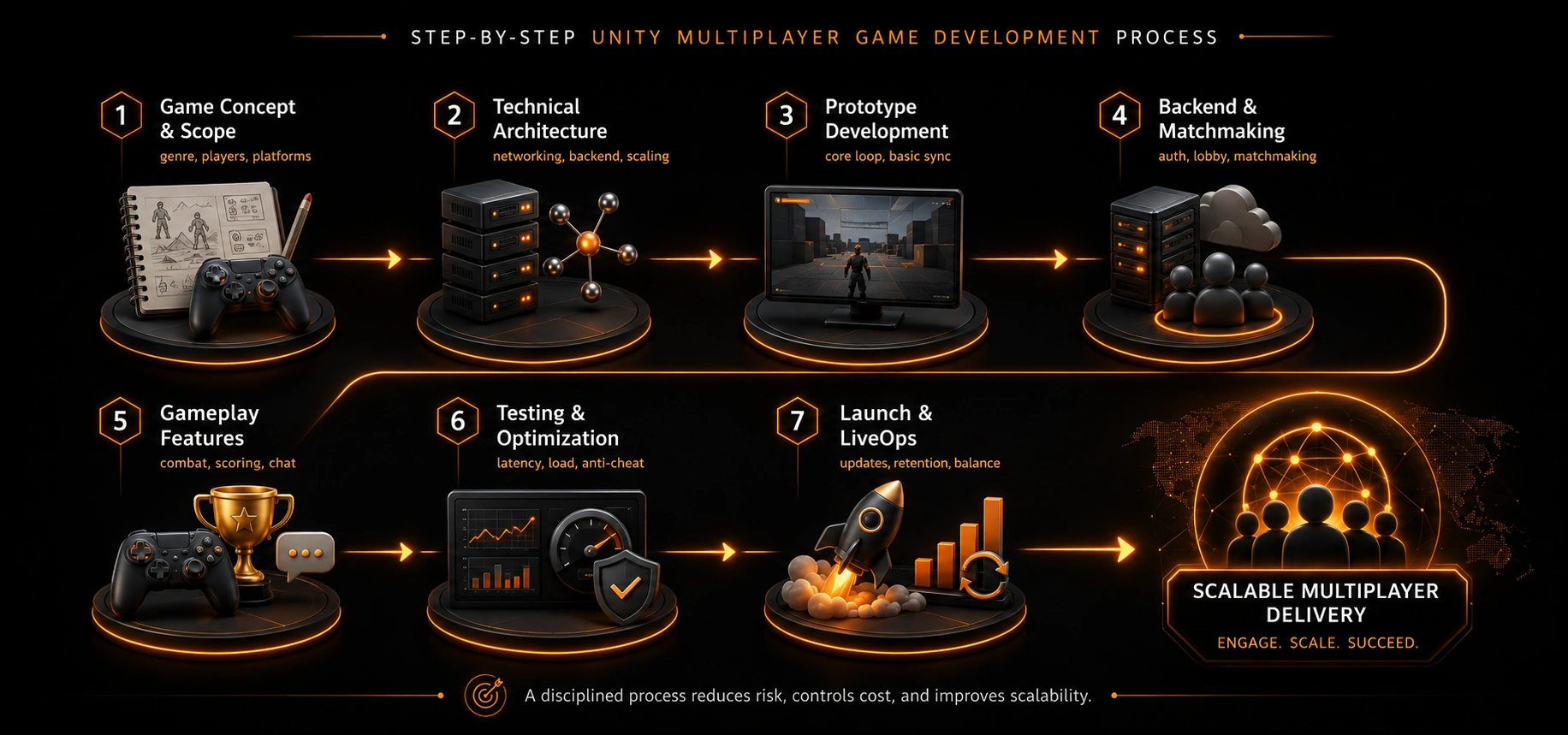
Step-by-Step Unity Multiplayer Game Development Process
The Unity multiplayer game development process must be disciplined, risk-aware, and scalable. Gameplay, networking, and backend systems should evolve together so every stage supports the next one.
1. Game Concept and Scope
Define the game genre, target player count, session structure, supported platforms, and revenue model before getting into technical details.
2. Technical Architecture Planning
Choose the networking approach, backend stack, database structure, hosting provider, and scaling strategy according to expected traffic.
A strong DevOps setup helps manage deployments, monitoring, server scaling, and release stability for live multiplayer products.
3. Prototype Development
Create the core gameplay loop and basic multiplayer sync to test mechanics and player interaction early.
4. Backend and Matchmaking
Build authentication, lobby creation, matchmaking rules, and secure handling of player data.
5. Gameplay Features
Add movement, combat, scoring, leaderboards, progression systems, and chat to complete the multiplayer experience.
For games that depend on avatars, skins, or stylized heroes, 3D character design can improve player identity and monetization options.
6. Testing and Optimization
Test server load, performance bottlenecks, disconnect handling, cheating scenarios, and latency under realistic user conditions.
7. Launch and LiveOps
Monitor data, fix issues, release updates, balance features, and improve retention through consistent content and LiveOps planning.
Key Challenges in Unity Multiplayer Game Development
Multiplayer games are more technically complex than single-player games. These issues must be solved early to protect performance, fairness, and long-term stability as player counts grow.
1. Latency and Lag
Fast response times are essential for real-time multiplayer games. Lag can be reduced with bandwidth optimization, efficient netcode, and regional servers.
2. Synchronization Issues
Movement, physics interactions, combat events, and scoring must stay synchronized across all connected devices to avoid desync problems.
3. Cheating and Exploits
Competitive multiplayer games require server-side validation, authoritative game logic, and anti-cheat technologies to prevent hacks and unfair advantages.
4. Server Scaling
As concurrent users increase, hosting, databases, matchmaking services, and monitoring systems must scale without hurting gameplay or increasing downtime.
5. Cross-Platform Compatibility
Supporting mobile, PC, console, and WebGL builds requires careful planning for input methods, performance limits, and network behavior. Cross-platform builds become easier when supported by expert mobile optimization and platform-specific engineering.
Our blog on how cross-platform gaming is transforming the industry explains why shared progression and consistent access now matter for modern players.
6. Post-Launch Maintenance
Multiplayer games require constant updates, balance changes, bug fixes, monitoring, and community feedback loops to maintain player trust after launch.
Dedicated quality assurance is important because multiplayer bugs often appear only during real user load, device variation, or unstable network conditions.
How to Choose the Right Unity Multiplayer Game Development Company?
Choosing the right Unity multiplayer game development company is critical for post-launch success. Basic Unity skills are not enough for multiplayer projects. The team must understand real-time networking, backend design, scalable infrastructure, testing, analytics, and LiveOps.
The right partner should have a proven record of multiplayer releases, strong backend capability, cloud and DevOps knowledge, and a clear QA process. Multiplayer faults often appear only when real users join, so testing must be planned for real load conditions. Clear cost estimates and post-launch support are just as important because multiplayer games keep changing after release.
Reviewing a studio’s game portfolio helps validate real-world experience across genres, platforms, and production styles.
Final Thoughts
Unity is a powerful engine for multiplayer games, but success depends on smart architecture, realistic cost planning, and experienced execution. Whether you are building a turn-based card game or a fast-paced PvP title, backend and networking decisions make the biggest difference.
If you are planning to build a real-time, co-op, or cross-platform multiplayer game, working with a team that understands scalability, performance, and LiveOps can save months of rework and prevent major budget overruns.
Frequently Asked Questions
1. How much does Unity multiplayer game development cost?
Unity multiplayer game development costs typically range from $10,000 to $500,000 or more. The final budget depends on the game genre, concurrent players, backend complexity, server infrastructure, supported platforms, and LiveOps requirements.
2. Is Unity good for multiplayer games?
Yes, Unity is widely used for multiplayer games across mobile, PC, console, and WebGL. It supports real-time, turn-based, co-op, PvP, and cross-platform multiplayer experiences when combined with the right networking and backend setup.
3. What backend is best for Unity multiplayer games?
The best backend depends on scale and performance needs. Photon works well for real-time games, PlayFab and Firebase suit data-driven and casual multiplayer, AWS GameLift supports large-scale servers, and Unity Gaming Services offers integrated tools for many use cases.
4. How long does it take to build a Unity multiplayer game?
A simple multiplayer MVP can take around 6 to 10 weeks. Mid-level multiplayer games usually require 3 to 6 months, while large-scale or cross-platform multiplayer projects can take 9 months or longer.
5. Can Unity support cross-platform multiplayer?
Yes, Unity can support cross-platform multiplayer across Android, iOS, PC, console, and WebGL. This requires careful backend architecture, input handling, performance optimization, and consistent networking logic across devices.
6. Is Unity multiplayer suitable for mobile games?
Unity is a strong choice for mobile multiplayer games, including casual PvP, co-op modes, and asynchronous gameplay. Its performance optimization tools and backend integrations make it suitable for mobile networks and varying device capabilities.
7. Do Unity multiplayer games require dedicated servers?
Not always. Casual, turn-based, or asynchronous multiplayer games can use managed or serverless backends. Competitive real-time games benefit from dedicated servers for better performance, fairness, and security.
8. What networking model works best for Unity multiplayer?
Client-server architecture is preferred for competitive and scalable multiplayer games because it allows server-side validation. Peer-to-peer networking can work for small casual games but offers less security and reliability.
9. How do Unity multiplayer games prevent cheating?
Most multiplayer games prevent cheating through server-authoritative logic, action validation, encrypted communication, and anti-cheat systems. Competitive games rely heavily on backend control to keep gameplay fair.
10. Does Unity support LiveOps and post-launch updates?
Yes, Unity supports LiveOps through analytics, remote configuration, content updates, balance changes, and backend monitoring. Ongoing updates are essential for maintaining engagement and stability in multiplayer games.