Key Takeaways
- Google DeepMind’s model powers sign-to-text functionality in Gboard and Live Transcribe on Pixel 11, initially supporting ASL-to-English.
- SL2T uses on-device MediaPipe Holistic to convert signing into pose-landmark coordinates, which are then translated into streaming text.
- SL2T processes pose landmarks instead of sending the raw camera feed for translation, allowing the original video to be discarded immediately.
- AI has transformed products involving computer vision, intelligent automation and real-time processing. ASL supports deaf users and provides easy access to digital and communication services.
Introduction
Mobile app development is increasingly moving beyond touch, typing, and voice as AI introduces new ways for users to interact with their devices. One of the latest examples is sign-language AI, where computer vision and machine translation work together to turn natural signing into digital input.Imagine communicating with your smartphone without typing a single word by simply signing naturally in front of the camera. Sign language AI for mobile apps is moving from experimental technology toward real-world accessibility solutions.Announced on August 12, 2026, SL2T brings sign-language AI into consumer products through Gboard and Live Transcribe on Pixel 11, initially translating American Sign Language (ASL) into English. It demonstrates how computer vision and machine translation can allow Deaf users to communicate with smartphones through sign language instead of conventional typing, including for searches, messages, documents, and Gemini interactions.This blog post focuses on how accessibility can increasingly be designed into the core interaction model of an application rather than added as a separate feature.
Why Sign Language Is a Unique Challenge for AI
Unlike speech transcription, where an AI system maps a sequence of sounds to text, sign-language translation involves understanding an independent natural language expressed through physical movement. Sign languages have their own grammars and lexicons, so a useful system needs to perform machine translation, not simply convert individual signs into words.Meaning can be conveyed simultaneously through the hands, arms, torso, head, and facial movements. A computer-vision system therefore has to track multiple parts of the body at high frame rates while also understanding how those movements change over time.This makes computer vision for sign language a particularly demanding problem. The system needs to distinguish meaningful signing from ordinary movement, identify spatial relationships, account for different signing speeds, and preserve enough information for the language model to interpret the sequence correctly.Early approaches included specialized hardware such as sign-language gloves. These approaches were limited because sign languages cannot be reduced to hand positions alone. Modern real-time sign language recognition increasingly relies on camera-based perception, allowing users to interact using devices they already carry.
Build Smarter, More Accessible Mobile Experiences
Google DeepMind SL2T: How Sign-Language-to-Text AI Works
Google DeepMind trained SL2T (Sign-Language-to-Text AI) on more than 100,000 hours of data across more than 50 sign languages, with roughly one-quarter of the data in ASL.Google DeepMind’s SL2T demonstrates how AI sign language translation can combine computer vision, landmark detection, and machine translation to convert signing into natural-language text.
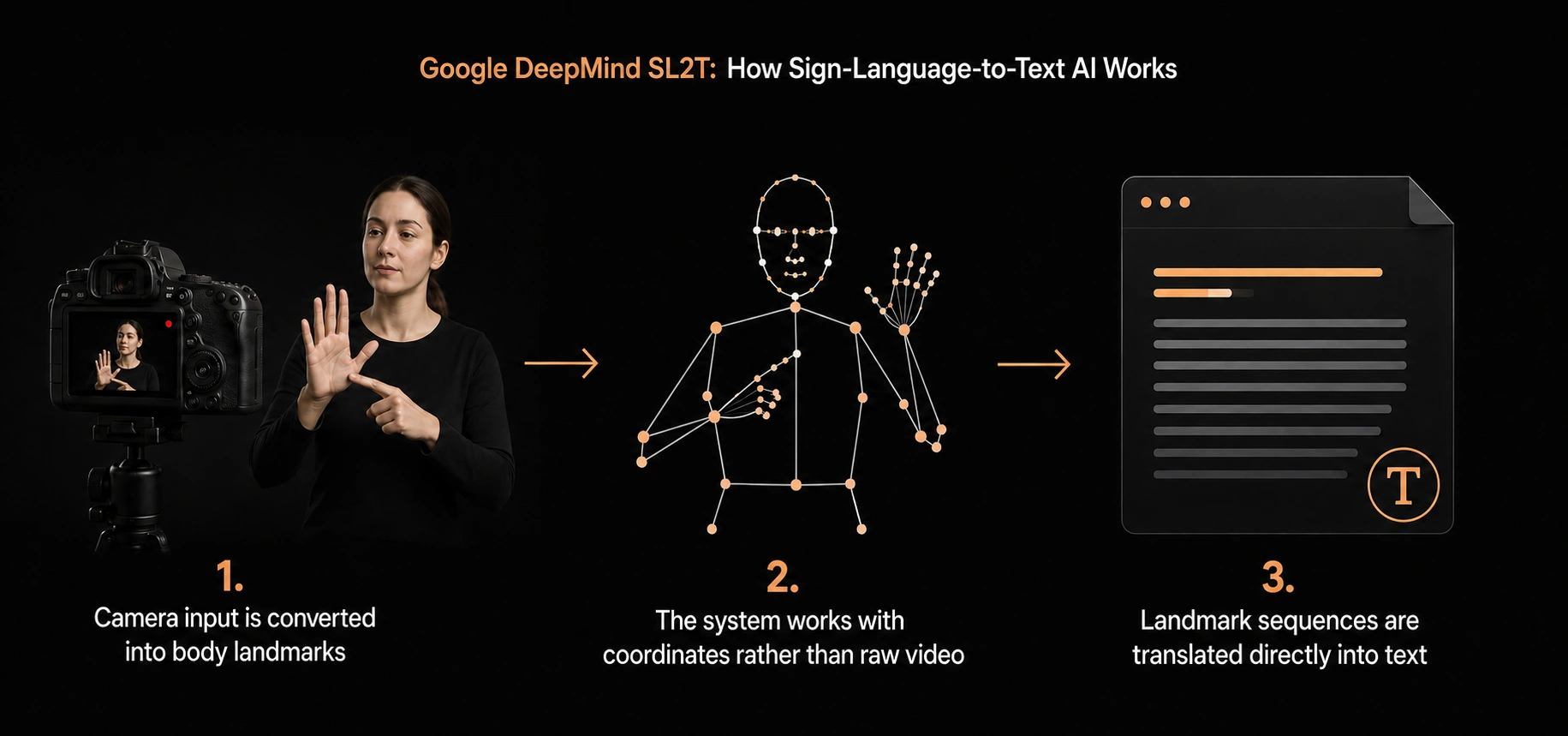
The architecture also takes an interesting approach to privacy and representation.
1. Camera input is converted into body landmarks
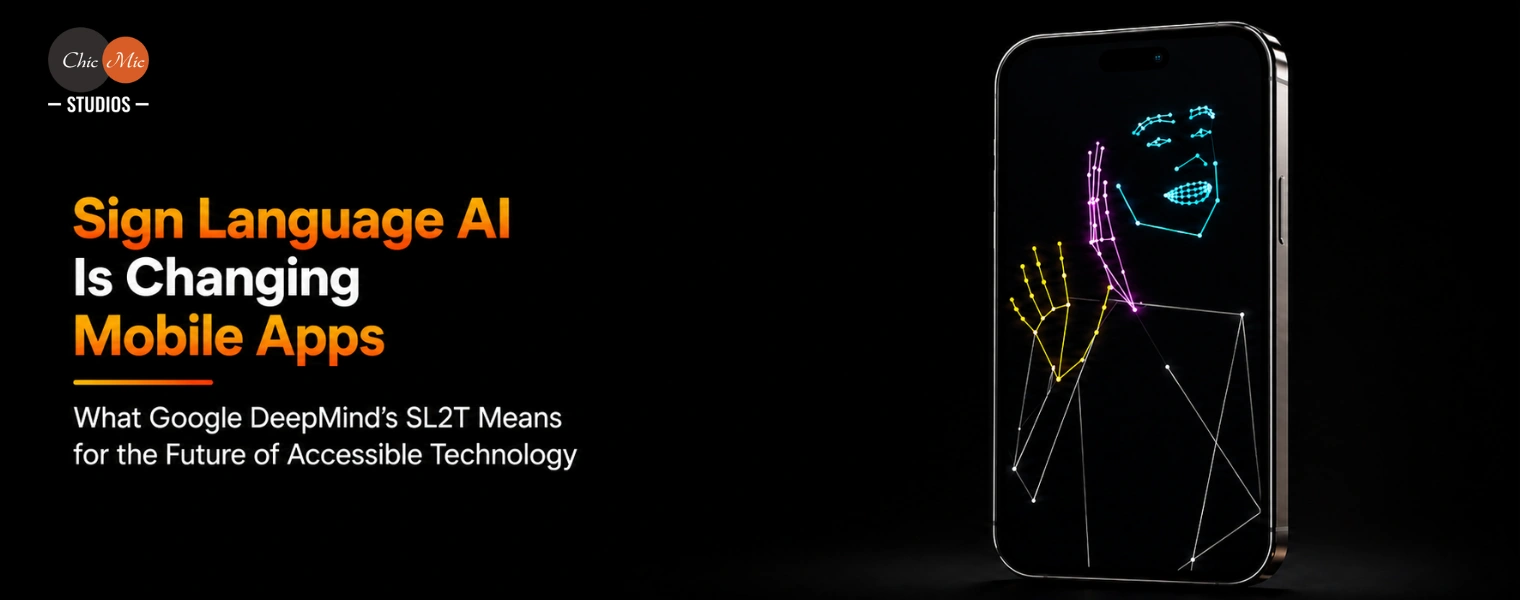
Instead of treating the entire camera feed as the input to the translation system, an on-device MediaPipe Holistic model tracks points on the signer’s body.These points represent geometric locations associated with relevant body movements.
2. The system works with coordinates rather than raw video
The landmark coordinates are sent for translation rather than the original camera footage. According to Google DeepMind, this allows the original video to be discarded immediately.This is an important example of privacy-aware AI architecture: the system attempts to send only the information required for the downstream task rather than retaining the complete visual recording.
3. Landmark sequences are translated directly into text
SL2T translates the coordinate sequence directly into text instead of first converting signs into an intermediate representation called “gloss.”Google DeepMind notes that gloss-based approaches can struggle to represent elements such as non-manual markers and spatial constructions. Direct translation allows the model to work with richer information contained in the movement itself.The important point is that this is not simply gesture recognition. It is a combination of visual perception and language translation.
What Can Users Actually Do With Sign-language-to-text AI?
Google DeepMind’s current implementation provides a useful example. SL2T powers sign-to-text dictation in Gboard and Live Transcribe on Pixel 11, initially for ASL-to-English. Users can sign where they would normally type, including web searches, messages, documents, and Gemini interactions. Live Transcribe also allows users to sign responses during conversations rather than typing them back.This changes the role of a sign language translation app. Instead of being a standalone utility that users open only when translation is needed, sign-language recognition can become part of everyday application workflows. Below are the use cases across industries.
1. Messaging & Communication
Users can sign messages and convert them into text, making everyday communication faster and more natural without relying on typing.
2. Search & Digital Assistants
Users can sign search queries or prompts instead of entering text manually, creating an additional input method for mobile search and AI assistants.
Sign-to-text interaction can help patients communicate with digital health platforms and provide an additional accessibility layer for healthcare services.
4. Education & E-Learning
Students can use signing as an input method for learning platforms, searches, assignments, and other educational interactions.
5. Customer Support
Customer-support applications can incorporate sign-language input, helping users communicate with support teams without having to type their questions or responses.
6. Banking & Financial Apps
Sign-based input could help users navigate financial services, search for information, and interact with customer-support features more independently.
7. Workplace Collaboration
Messaging, meeting, and collaboration platforms could use sign-to-text capabilities to support more accessible workplace communication.
8. Government & Public Services
Public-service applications could use sign-language input to help users access information, complete digital forms, and interact with online services.
Have an AI-Powered Mobile App Idea?
What Sign Language AI for Mobile Apps Means for Developers
For mobile developers, the important question is not only, “Can an AI model translate sign language?” It is: “How can visual language become part of the application’s user experience?” Building an AI-powered mobile experience requires more than the AI model itself. Product architecture, mobile frameworks, backend services, APIs and testing all have to work together.The opportunity extends beyond dedicated accessibility tools. Mobile apps for deaf users can incorporate sign-language recognition into messaging, education, healthcare, customer support, and other everyday workflows.
1. On-device AI and latency
Real-time sign-language recognition requires low latency. Delays between signing and text output can make a conversation feel unnatural.In SL2T’s architecture, on-device MediaPipe Holistic tracks the signer’s pose, while the resulting geometric coordinates are sent to the server for translation. This approach reduces the amount of sensitive visual information transmitted from the device.A practical architecture may therefore divide the workload between edge AI and cloud-based inference, depending on model size, latency requirements, privacy constraints, and device capabilities.
2. Device and camera variation
Mobile applications need to work across different cameras, screen sizes, processors, lighting conditions, and operating-system versions.A model that performs well under controlled conditions may behave differently when users sign outdoors, hold the phone at different angles, or use one hand while holding the device.Google DeepMind specifically discusses engineering for practical issues such as streaming latency, one-handed signing, left-handed users, and non-signing inputs.
3. Privacy and data minimization
Applications using cameras to interpret human movement need a clear data strategy.Processing pose landmarks instead of retaining raw video is one possible privacy-preserving pattern. However, this does not automatically make an application compliant with regulations such as GDPR or HIPAA. Compliance depends on the complete data architecture, storage practices, vendors, consent mechanisms, security controls, and applicable jurisdiction.For developers building AI accessibility technology, privacy should therefore be considered at the architecture stage rather than after deployment.
Building Accessible AI Requires More Than a Machine-Learning Model
Building sign language AI for mobile apps requires more than integrating a machine-learning model. Developers need to consider computer-vision pipelines, inference latency, mobile hardware, privacy, accessibility testing, and the overall user experience.This makes accessible mobile app development more than a UX consideration. Developers need to account for AI inference, camera interaction, latency, privacy, accessibility testing, and the needs of diverse users from the beginning.
| Phase / Function |
Technologies & Tools |
Role |
| Camera Input |
Android CameraX, AVFoundation, WebRTC |
Captures real-time video of the signer. |
| Computer Vision |
OpenCV, MediaPipe |
Processes video and identifies relevant visual features. |
| Pose & Landmark Detection |
MediaPipe Holistic, MediaPipe Hands, MoveNet |
Tracks hands, body, face, and movement landmarks. |
| AI / ML Model |
PyTorch, TensorFlow, JAX |
Trains and runs models that interpret signing patterns. |
| Sign-Language Translation |
Transformer-based models, TensorFlow/PyTorch NLP pipelines |
Converts movement sequences into natural-language text. |
| On-Device AI |
TensorFlow Lite, LiteRT, ONNX Runtime, Core ML |
Runs AI inference locally for lower latency and improved privacy. |
| Backend & APIs |
Python, FastAPI, Node.js, REST APIs |
Handles model services, application logic, and integrations. |
| Cloud Infrastructure |
AWS, Google Cloud, Microsoft Azure |
Provides scalable compute, storage, and model-serving infrastructure when cloud processing is required. |
| Mobile Development |
Kotlin, Swift, Flutter, React Native |
Integrates AI capabilities into Android and iOS applications. |
| Data & Model Training |
Python, NumPy, Pandas, MLflow |
Prepares training data, manages experiments, and evaluates models. |
| Testing & Monitoring |
PyTest, Firebase, MLflow, TensorBoard |
Tests application behavior and monitors model performance. |
The Future of AI-Powered Accessibility in Mobile Apps
Sign-language translation is one example of how AI-powered accessibility solutions can change the way people interact with digital products. Sign language-to-text AI represents a broader movement toward multimodal mobile interfaces.For years, smartphones have primarily been controlled through touch, typing, and speech. Computer vision introduces another possibility: using physical movement as an input method. Sign language is an especially meaningful example because it demonstrates how AI can adapt digital interaction to the user’s natural communication method.Google DeepMind says there are more than 200 sign languages and an estimated 70 million Deaf and hard-of-hearing people who use them. As models become more capable and support expands to additional sign languages, developers could explore interfaces where signing works alongside text, speech, images, and other input methods.The result may be a more flexible approach to mobile UX, one where accessibility is not a separate mode, but part of the core product experience.
Current Limitations of Sign Language AI
Sign-language AI has made significant progress, but it is not perfect. Google DeepMind reports remaining errors involving rare signs, rapid fingerspelling, passive constructions, classifier depictions, and tense when contextual information is limited. The system also has to account for variations such as one-handed signing and non-signing movements.These limitations matter in applications where accuracy has serious consequences. A sign-language AI system should not automatically be treated as a replacement for qualified human interpreters in sensitive medical, legal, or other high-stakes situations.For production applications, developers should instead consider confidence handling, error recovery, human review, clear user feedback, and domain-specific evaluation.
ChicMic Studios: Where AI and Mobile Development Come Together
Turning these ideas into a real application requires more than selecting an AI model. A right AI and mobile app development partner like ChicMic Studios help building a scalable solution. A production system may involve computer-vision pipelines, landmark detection, model inference, APIs, mobile architecture, backend services, privacy controls, testing, monitoring, and accessibility-focused UX.This is where the broader AI and mobile development ecosystem becomes important. ChicMic Studios works across AI development and mobile application development, while its AI portfolio includes computer-vision and other intelligent application use cases.The same engineering principles used for sign-language AI visual perception, real-time inference, data processing, model evaluation, and mobile integration can also apply to other accessibility-focused applications. The opportunity of collaboration of AI with mobile app development is bigger than one translation model. It is about designing digital products that can understand the different ways of communicating.
Conclusion
Google DeepMind’s SL2T shows what happens when computer vision and language AI converge with mobile technology. Sign language can be captured through a smartphone camera, represented as movement data, and translated into streaming text without requiring users to change how they naturally communicate.
The technology still has limitations, but its direction is clear. Accessibility is becoming an engineering problem that can be addressed at the model, device, interface, and product levels. Similar principles are already being applied across AI products involving computer vision, intelligent automation and real-time data processing. Explore ChicMic Studios’ AI portfolio to see examples of AI applications.
FAQs
1. What is Google DeepMind SL2T?
Google DeepMind SL2T stands for Sign-Language-to-Text. It is a Google DeepMind model designed to translate sign-language input into text. Its first consumer deployment supports ASL-to-English sign-to-text features in Gboard and Live Transcribe on Pixel 11.
2. How does AI recognize sign language?
AI can use computer vision for sign language to detect body, hand, and facial landmarks, represent their movement as a sequence, and use a machine-learning model to interpret that sequence as language.
3. Can sign language AI work on smartphones?
Yes. Google DeepMind’s SL2T demonstrates that sign language AI for mobile apps can support smartphone-based sign-language-to-text interaction through on-device pose tracking and translation infrastructure. The initial release is available on Pixel 11.
4. Is sign language translation the same as gesture recognition?
No. Gesture recognition typically identifies predefined movements, while AI sign language translation requires understanding an independent language with its own grammar, vocabulary, spatial structures, and non-manual signals.
5. What technologies are used in sign language translation apps?
A typical sign language translation app can combine computer vision, pose estimation, landmark detection, machine learning, language translation, real-time inference, mobile development, and privacy-aware data processing.
6. How can mobile apps support Deaf and hard-of-hearing users?
Mobile apps for deaf users can incorporate sign-language recognition, real-time transcription, accessible interfaces, visual notifications, and other multimodal features to make communication and digital services easier to access.
7. What is accessible mobile app development?
Accessible mobile app development involves designing applications that can be used effectively by people with different abilities and communication needs. This can include accessible UX, assistive technologies, multimodal interaction, and AI-powered features such as sign-language recognition.
8. What are AI-powered accessibility solutions?
AI-powered accessibility solutions use technologies such as computer vision, machine learning, speech recognition, and natural-language processing to make digital products more usable and adaptable for people with different accessibility needs.
9. What is the future of sign language AI?
The technology is moving toward broader language coverage, better real-time performance, more natural interaction, and deeper integration with everyday digital products. Google DeepMind says it is working toward additional sign languages, sign-language generation, and further AI capabilities.
10. How much does it cost to develop a sign language translation app?
The cost of developing a sign language translation app depends on the supported sign languages, recognition accuracy, real-time processing, AI model complexity, platform requirements, accessibility features, and third-party integrations. A basic prototype may cost less, while a production-ready app with on-device AI, high accuracy, strong privacy, and multilingual support requires a larger investment.
Build an Accessible AI-Powered Mobile App with ChicMic Studios