Unity 6 vs Unreal Engine 5: Full Comparison (2026)
Key Takeaways
- Strategic Choice: The right engine depends on your production goals, target platforms, and long-term scalability rather than raw technical capability.
- Development Speed: Unity 6 enables faster iteration, easier onboarding, and quicker deployment, making it ideal for teams that need to move and adapt quickly.
- Visual Priority: Unreal Engine 5 is the better option when visual realism, cinematic quality, and high-end rendering are central to the experience.
- Cost Planning: Unity offers predictable licensing for structured growth, while Unreal reduces upfront risk but ties long-term cost to commercial success.
- Project Fit: Unity suits mobile, XR, indie, and multi-platform projects, while Unreal fits AAA games, simulations, and visual-first productions.
- Industry Direction: By 2026, studios increasingly choose engines per project, using Unity for scale and Unreal for visual impact.
Unity 6 vs Unreal Engine 5 – Features, Performance & Developer Guide (2026)
If you are trying to choose between Unity 6 vs Unreal Engine 5, you are essentially comparing two of the most advanced real-time 3D engines available on the market today. By 2026, Unity 6 and Unreal Engine 5 are fully developed, widely adopted, and deeply embedded across numerous sectors from AAA production, simulation systems, and virtual production pipelines to mobile gaming and independent creation.
Capability is not the real differentiator anymore. Both engines are capable of producing top-notch modern games. Now, it is about workflow and philosophy. The main goals of Unity 6 are flexibility, cross-platform deployment, and fast iterations. Unreal Engine 5’s primary objectives are cinematic realism, production-grade visual output, and high-end rendering systems.
This is the difference that really helps developers, studios, and companies decide the best engine for their project.
What Are Unity 6 and Unreal Engine 5?
Unity 6 is the latest evolution of Unity’s ecosystem, and it aims to improve performance while retaining its main advantage: cross-platform programming. For years, Unity has been a popular choice for making mobile games, AR and VR apps, indie games, and lightweight 3D interactive experiences. Unity 6 continues this with improved rendering pipelines, reduced memory consumption, improved DOTS architecture, and better collaboration for teams that are geographically separated.
Unreal Engine 5, however, is designed for high-end real-time 3D experiences. It introduces Lumen, which allows for real-time global illumination without baked lighting, and Nanite, which allows for highly detailed geometry without traditional polygon limits. AAA games, film production, automotive visualization, and architectural simulation use Unreal Engine 5 to create cinematic-quality visuals in real time.
So, in short, Unreal Engine 5 is built for realism and visual power, while Unity 6 is built for accessibility and flexibility.
Key Differences Between Unity 6 and UE5
The key difference between Unity and Unreal Engine game development services workflows is how each engine approaches development structure. Unity 6’s modular architecture allows developers to create apps with reusable packages, scripts, and components. Because of this, it is very flexible and appropriate for projects that require quick iterations or cross-platform deployment.
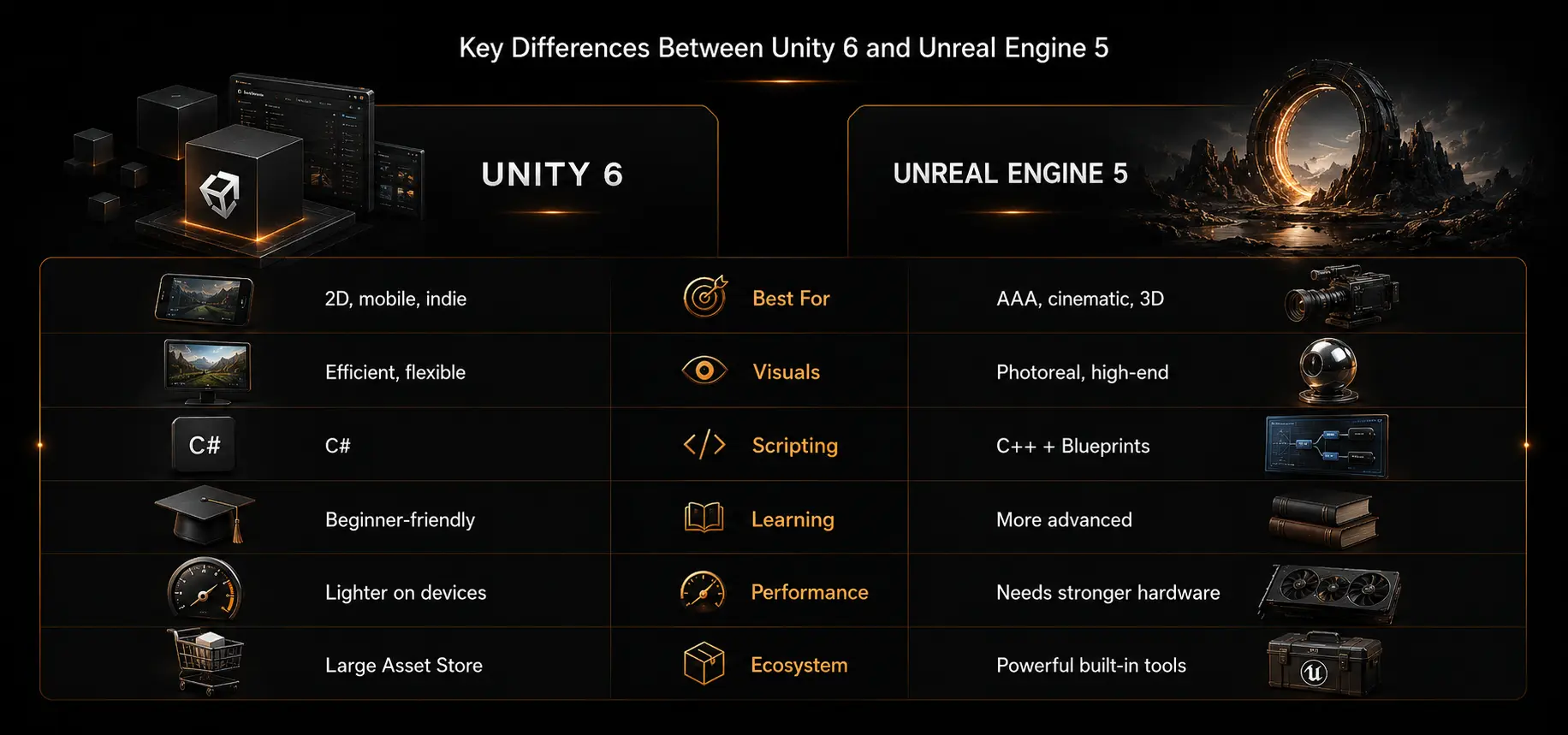
The majority of fundamental technologies such as rendering, physics, and lighting are intricately tied into Unreal Engine 5’s more integrated framework. Developers have less architectural freedom than Unity, but they can get great visual quality early without building systems from scratch.
In practical terms, Unreal feels like working in a fully built studio production environment, whereas Unity feels like building things up piece by piece.
Unity 6 vs Unreal Engine 5: Workflow Comparison
| Area |
Unity 6 |
Unreal Engine 5 |
| Iteration Speed |
Very fast |
Moderate |
| Debugging |
Easier |
More complex |
| Visual Scripting |
Limited |
Advanced using Blueprints |
| Architecture Style |
Modular |
Integrated |
| Learning Curve |
Easier |
Steeper |
Unreal is production-driven, whereas Unity is engineering-driven. You can also compare this with our earlier breakdown of Unity vs Unreal comparison, pros, cons, and key differences for a broader decision-making view.
Performance Comparison
Theoretical performance is less important than real-world usage when analyzing game engine performance comparison. DOTS and modern rendering algorithms have significantly improved Unity 6’s performance. It works great for lightweight 3D apps, mid-range hardware, and mobile devices. This is one of the reasons why Unity dominates mobile game creation in areas with a high degree of device diversity, such as Latin America, Southeast Asia, and India.
Unreal Engine 5 is all about high-performance hardware. Nanite supports huge geometrical detail, while Lumen provides dynamic lighting in real time. This level of authenticity does, however, come with higher memory utilization and more stringent optimization requirements.
What separates the two is the difference between peak performance and consistency. Unreal’s goal is to deliver the best possible visual quality within hardware limits. Unity’s goal is to work well everywhere.
Unity 6 vs Unreal Engine 5: Performance Comparison
| Metric |
Unity 6 |
Unreal Engine 5 |
| Mobile Performance |
Excellent |
Moderate |
| High-End PC |
Good |
Excellent |
| Memory Usage |
Efficient |
Heavy |
| Optimization Effort |
Medium |
High |
For mobile game development, Unity 6 remains the most realistic pick.
Graphics Quality and Visual Fidelity
The visual difference between UE5 cinematic graphics vs Unity 6 is most apparent when comparing them. Currently, Unreal Engine 5 is leading the charge for real-time photorealism with features like Lumen and Nanite, allowing for dynamic lighting and incredibly realistic scenes without the usual performance limitations. With HDRP, complex shaders, and advanced lighting operations, Unity 6 has improved a lot to provide high-quality visuals. However, it often needs more manual setup & optimization than Unreal Engine 5.
1. Real-Time Lighting
Unity 6 uses HDRP and baked or hybrid lighting systems to achieve high control over visuals and optimization flexibility. Unreal Engine 5 uses Lumen for full dynamic global illumination.
2. Geometry Detail
While Unity 6 uses standard mesh optimization and level-of-detail techniques, Unreal Engine 5’s Nanite enables film-level asset complexity without compromising performance. If your project depends heavily on characters, props, and realistic environments, strong 3D game development planning becomes just as important as the engine choice itself.
3. Visual Realism
Unreal Engine 5 has near-photorealistic environments out of the box, while Unity 6 achieves realism through careful tuning of shaders, light balance, and user configuration.
4. Art Style Flexibility
Unreal Engine 5 is mostly focused on realistic and cinematic visual pipelines, while Unity 6 can easily accommodate more stylized and hybrid graphic styles. For teams building stylized mobile, casual, or side-scrolling games, 2D game development workflows can often be more efficient in Unity than in Unreal.
5. Rendering Workflow
Unity 6 has modular rendering pipelines that need to be configured and optimized by developers. Unreal Engine 5 has an automated rendering pipeline with built-in systems.
Watch Unreal Engine 5 Visual Capabilities
Ease of Use and Learning Curve
Unity 6 uses C#, which is easy to learn and has strong documentation and community support, so it is usually easier for beginners. Its more user-friendly interface makes it one of the most popular starting points for game development.
However, UE5 has a higher learning curve due to its deeper engine design. But it makes up for it with powerful features like Blueprints that let you do visual programming without actually having to code. As a rule, Unreal requires more technical expertise over time, while Unity is more about faster onboarding.
1. Beginner Friendly
Unity 6, with its easier C#, more streamlined workflows, and simpler interface, makes it easier for novices to produce. Beginners can also learn more from our blog on why Unity is considered one of the best game engines for fast learning and practical development.
2. Visual Scripting
Unreal Engine 5 utilizes Blueprints for advanced visual scripting, enabling you to develop gameplay without coding. However, you still need familiarity with the engine. For a deeper technical comparison, our guide on Blueprint vs C++ in Unreal Engine explains when visual scripting is enough and when custom code becomes necessary.
3. Learning Speed
Unreal Engine 5 has more complex systems, so it is a longer process to learn the basics of game production than Unity 6.
Engine Depth
Unreal Engine 5 allows for more control of rendering, physics, and performance systems, increasing complexity but also unlocking new creative possibilities.
4. Industry Preference
Unreal Engine 5 is the engine of choice for AAA companies and global film production pipelines, while Unity 6 is often the engine of choice for independent and mobile developer ecosystems.
Platform Support: Mobile, Console, and PC
Unity 6 is still the best engine for cross-platform development. It is perfect for developers who want to create once and deploy everywhere, supporting Android, iOS, PC, consoles, WebGL, AR, VR, and even embedded devices. One of the main reasons why Unity continues to dominate multi-platform and mobile-first development workflows is adaptability. If the goal is to ship across devices with one codebase, cross-platform app development expertise can help reduce duplicated effort and improve long-term maintainability.
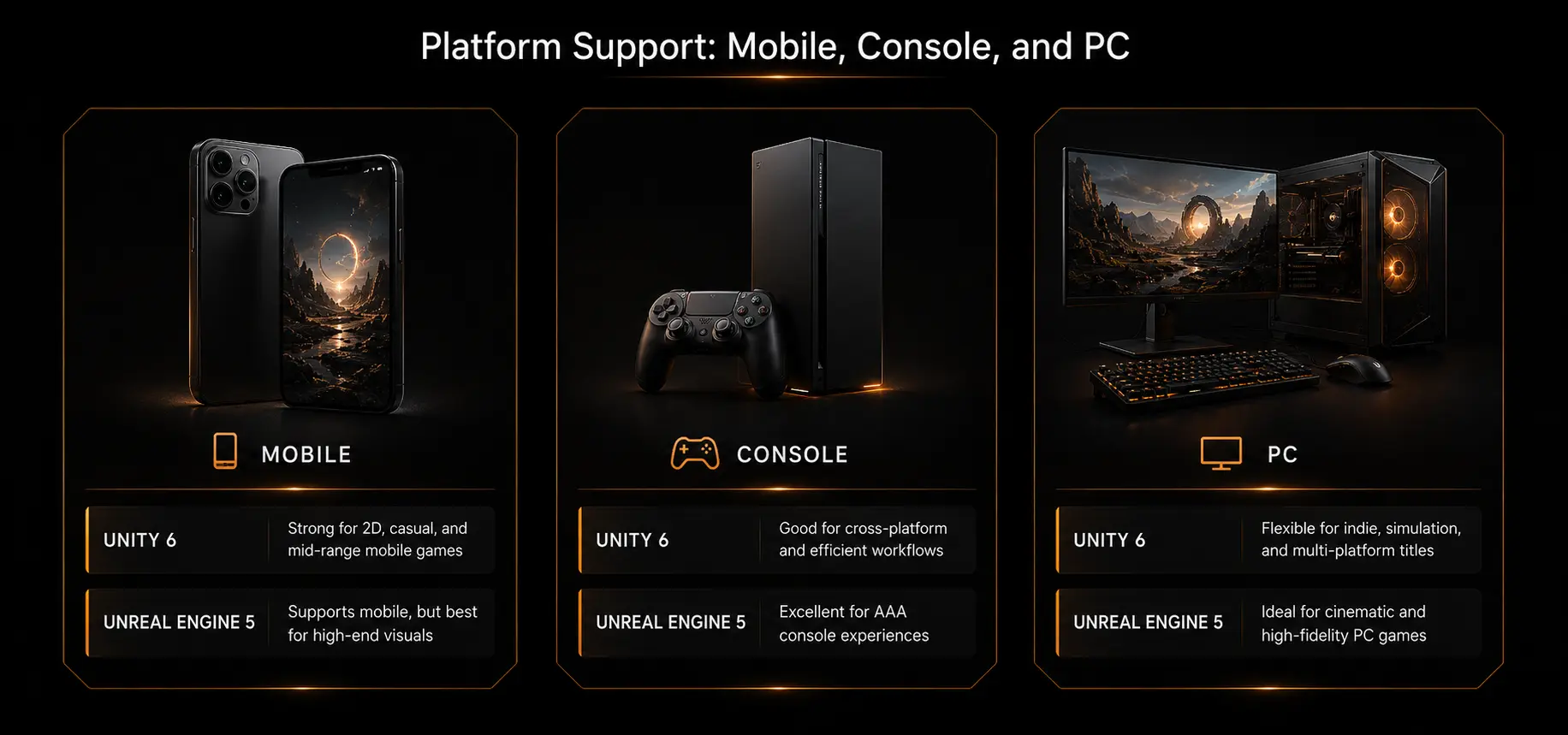
You can use Unreal Engine 5 with all major platforms, but its real strength is in the development of high-end PCs and consoles. It is optimized for providing advanced visuals and cinematic performance compared to Unity’s lightweight deployment strategy. This often requires more powerful hardware and tighter optimization.
Platform Support Comparison
| Platform |
Unity 6 Performance |
Unreal Engine 5 Performance |
Notes |
| Android |
Excellent |
Good |
Unity leads in mobile optimization and device range. |
| iOS |
Excellent |
Good |
Unity offers smoother performance on varied iPhone models. |
| PC |
Good |
Excellent |
Unreal excels in high-end graphical performance. |
| Consoles |
Good |
Excellent |
Unreal is preferred for AAA console titles. |
| WebGL |
Strong |
Limited |
Unity has better browser-based support. |
| AR & VR |
Excellent |
Good |
Unity is widely used for XR ecosystems. |
| Embedded Systems |
Excellent |
Limited |
Unity supports lightweight device deployment better. |
| High-End Graphics |
Good |
Excellent |
Unreal dominates cinematic visuals. |
| Performance Optimization |
Medium |
High effort |
Unreal needs more tuning for stability. |
Watch Unity 6 Cross-Platform Development in Action
Asset Store, Tools, and Marketplace
These days, it is not only about engines but how fast you can create with premade tools and assets. Both Unity 6 and Unreal Engine 5 have a rich marketplace that can help developers shorten development time, but the two engines have different approaches. Unity is all about accessibility and size. It offers developers a huge library of resources in almost every category. Unreal Engine, on the other hand, focuses on curation and production-ready quality, with fewer but often more polished and near-final assets. Asset quality also depends on design consistency, which is why game design and digital design services play an important role in turning marketplace assets into a polished final product.
When you actually operate in both ecosystems, you can clearly see the difference. Unity game development services is often chosen when speed, experimentation, and fast prototyping are critical. Unreal is the go-to when teams want better assets that are ready to go into AAA or cinematic production processes as-is, without modification.
The comparison below makes it easier to see how both marketplaces cater to different types of developers and project goals.
1. Marketplace Comparison
| Factor |
Unity Asset Store |
Unreal Marketplace |
| Asset Variety |
Very high |
Medium |
| Quality Control |
Mixed |
High |
| Pricing |
Budget-friendly |
Premium |
| Indie Developer Support |
Very strong |
Moderate |
| Production Readiness |
Good |
Excellent |
| Learning Resources |
Extensive |
Limited but polished |
| Speed of Prototyping |
Very fast |
Moderate |
| Plugin Ecosystem |
Extremely large |
Curated but smaller |
This comparison shows Unreal prioritizes quality and refinement, while Unity prioritizes flexibility and volume. Both strategies are useful, but they are appropriate for different types and stages of studios.
2. Rapid Prototyping Speed
Unity is much faster for prototyping because of the massive library of assets, plug-and-play templates, and community-powered tools that let developers create quickly without starting from scratch.
Production Quality Focus
Unreal Marketplace assets are often more polished and production-ready. This is especially true in the case of AAA development or high-end visual projects where consistency is more important than volume.
3. Ecosystem Depth
Unity’s much larger ecosystem of tools, scripts, shaders, and extensions gives independent creators more flexibility, but it can sometimes require more customization and optimization.
4. Workflow Efficiency
Unity assets are often more flexible than polished, so developers may need to do more tweaking. Unreal fills this gap by delivering assets that are more in tune with final production standards, out of the box.
Best Use Cases for Each Engine
Unreal Engine 5 and Unity 6 are both powerful engines, but they offer very different production environments. Unity is popular for cross-platform and mobile-first environments where you need to optimize performance across multiple platforms. Unreal Engine 5 is used in high-end production pipelines for visual integrity, cinematic quality, and massive rendering systems.
In fact, many modern studios do not really stick to one particular engine but make choices depending on the nature of the project, often using both depending on production needs. The table below clearly separates where each engine performs best in real-world usage.
Unity 6 vs Unreal Engine 5: Best Use Cases
| Use Case Area |
Unity 6 |
Unreal Engine 5 |
| Mobile Game Development |
Widely used for Android and iOS due to lightweight builds and strong device optimization. |
Used for select high-end mobile titles with strong hardware requirements. |
| Indie Game Development |
Preferred due to fast iteration, easier learning curve, and large asset ecosystem. |
Used for indie projects focused on cinematic visuals or high-end 3D experiences. |
| AR & VR Development |
Strong presence due to XR tools, lightweight architecture, and broad device support. |
Used in advanced enterprise VR and high-fidelity immersive simulations. |
| Simulation Systems |
Commonly used in training, education, industrial, and real-time simulation tools. |
Used in high-end simulation systems requiring photorealistic environments. |
| Cross-Platform Applications |
Excellent support for building and deploying across multiple platforms. |
Supported, but generally heavier and more performance-focused. |
| AAA Game Development |
Used in some AAA projects, especially mobile or stylized titles. |
Widely adopted in AAA console and PC game development. |
| Cinematic Production |
Used for real-time cinematics and stylized production workflows. |
Strongly preferred for virtual production and film-quality cinematics. |
| Architectural Visualization |
Capable with HDRP and customization, but requires more setup. |
Frequently used for photorealistic architectural rendering. |
| Automotive Simulation |
Used in prototyping and interactive visualization systems. |
Common in high-fidelity automotive design and simulation. |
| High-End Console Games |
Used selectively based on performance and style requirements. |
Common choice for high-end PlayStation and Xbox development. |
In enterprise and industrial contexts, real-time engines are increasingly combined with AI, data pipelines, and sensor-driven systems. This approach aligns with how IBM frames modern digital transformation, where real-time simulation and digital twins play a central role in optimizing industrial operations, training environments, and large-scale system planning. If you want to see how engine strategy fits into real production outcomes, explore our game portfolio for examples of shipped game and interactive projects.
Cost, Licensing, and Business Considerations
Both Unity 6 and Unreal Engine 5 are free to beginners, independent developers, and small studios building out early prototypes. The real difference appears when you scale up the project. Unity’s subscription pricing model is predictable but can become costly as projects grow larger, with prices increasing with functionality, team size, and revenue tiers. Before committing to a full production budget, teams can validate scope, features, and technical risk through quality assurance and testing planning.
Unreal Engine 5 has a different royalty-based structure where you do not have to pay until your game starts making more than a certain amount. At first, this gives Unreal a feeling of flexibility, but the success of the project will determine the final cost. So studios usually base decisions on expectations of project growth rather than just the initial outlay. As these real-time systems become more intelligent, businesses can also explore AI development solutions to connect simulation engines with predictive analytics, automation, and data-driven decision-making.
1. Pricing Structure Model
Unity has Personal, Pro, and Enterprise tiers of subscriptions. After the revenue threshold, Unreal takes a royalty percentage, usually five percent on sales from commercial products.
Startup Affordability Level
Unity scales with team size and is fairly priced for long-term use. Unreal is cheaper at first, making it suitable for small studios and early indie developers.
2. Revenue Scaling Impact
As teams and enterprises get larger, Unity costs go up. Unreal costs increase only when income from the product exceeds certain thresholds.
3. Budget Predictability Factor
Unity simplifies financial planning with predictable monthly or annual costs. Unreal costs depend on the success of the project and the state of the market.
4. Enterprise Suitability Choice
Unity works well for structured businesses that need set license fees. Unreal is great for high-risk, high-reward projects where minimizing initial costs is important.
5. Long-Term Expense
Big studios might eventually find Unity to be expensive. Unreal is only costly if a project achieves a lot of commercial success.
Which Engine Should You Choose in 2026?
Given that each engine is created to address different production problems, there is no clear winner in the Unity 6 vs Unreal Engine 5 debate. By 2026, it is less about ability and more about matching the engine to your process, target platforms, and long-term production goals.
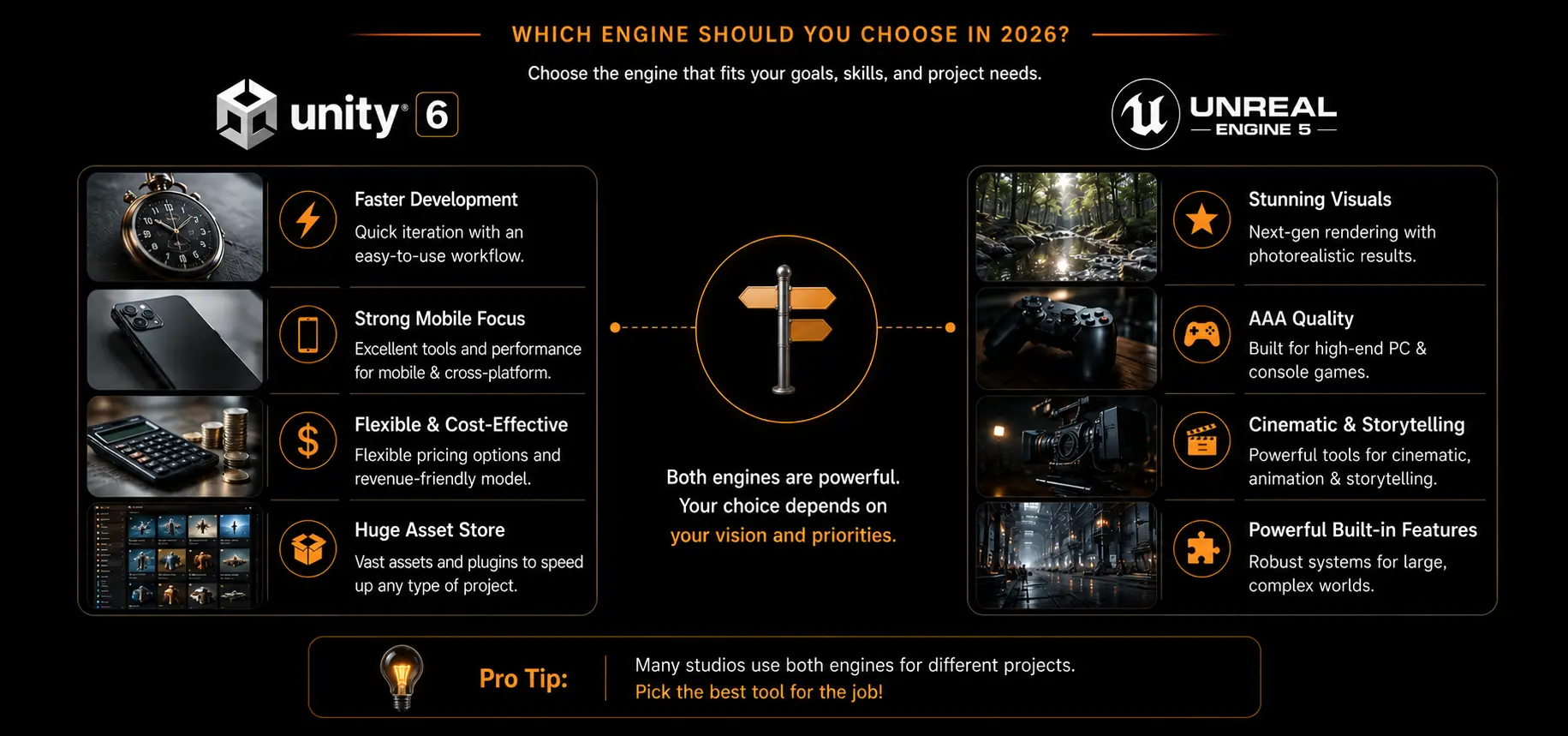
Unity 6 is designed to be fast, flexible, and device agnostic. It is good for teams that need to iterate fast, deploy cross-platform, and make it easier for new engineers to get started. Unreal Engine 5 has been built for visual ambition and production depth. It is perfect for projects that demand cinematic quality, realism, and high-end technology.
1. When Unity 6 Makes More Sense
If your project involves mobile, online, or multi-platform distribution, Unity 6 is the better choice. It is going to be very useful for indie studios, startups, and mid-sized teams that need to move fast, test ideas often, and ship across multiple platforms without rebuilding fundamental systems. Unity’s massive ecosystem, modular architecture, and small runtime make it easier to scale projects gradually. Unity is also a strong fit for browser-based games, where web game development can help studios reach users without forcing app downloads.
2. When Unreal Engine 5 Is the Better Fit
Unreal Engine 5 is stronger for applications that need better graphics and production-grade rendering. This is especially good for high-end console or PC games, virtual production, AAA games, movies, and architectural visualization. If realism, lighting quality, and visual impact are the primary goals of your project, Unreal delivers those outcomes with fewer compromises, assuming you can handle the more demanding workflow. For studios targeting desktop-first performance and advanced visuals, PC game development services can help handle optimization, platform standards, and release readiness.
If Unreal Engine 5 fits your project, understanding how to hire Unreal Engine 5 developers can help you evaluate candidates’ C++, Blueprint, and optimization skills before building your team.
3. A Simple Way to Decide
If speed, flexibility, and reaching multiple platforms with little difficulty are your top priorities, Unity 6 is the more sensible option. This is especially important for teams that require rapid iteration and scalable deployment. If you are working on projects that are targeting high-end PC, console, or visual-first experiences, then Unreal Engine 5 is a better investment if realism, cinematic visuals, and large-scale production quality are your top priorities.
In 2026, it makes more sense to ask what engine is best for your project’s building, scaling, and shipping needs than what engine is “better.”
4. Final Thoughts
In the discussion of Unity 6 and Unreal Engine 5, the question of which engine is better overall is not the issue. It depends on which engine suits your goals better. Unity 6 offers rapidity, flexibility, and reach across a broad spectrum of platforms. Unreal Engine 5 has production capability, realism, and cinematic quality.
Hype does not power the smartest studios in 2026. They are deciding based on what kind of experience they want to build, how their workflow functions, and how scalable the final product needs to be.
FAQs – Unity 6 vs Unreal Engine 5
1. What is the main difference between Unity 6 and Unreal Engine 5?
The main difference is focus. Unity 6 is built for flexibility, cross-platform development, and faster iteration, while Unreal Engine 5 focuses on cinematic-quality visuals and high-end real-time rendering.
2. Which engine has better graphics — Unity 6 or Unreal Engine 5?
Unreal Engine 5 has better out-of-the-box graphics due to technologies like Lumen and Nanite, which enable highly realistic lighting and geometry in real time.
3. Which engine is easier for beginners?
Unity 6 is generally easier for beginners because it uses C# & has a simpler, more approachable workflow compared to Unreal Engine 5.
4. Which is better for mobile game development?
Unity 6 is better for mobile game development because it is optimized for performance across a wide range of devices and supports efficient cross-platform deployment.
5. How do Unity 6 and UE5 compare for 2D games?
Unity 6 is significantly better for 2D game development, offering stronger tools, workflows, and long-standing support for 2D projects. For more context, you can also read our guide on whether Unreal Engine development is good for 2D games.
6. What about VR & AR development?
Unity 6 leads in VR and AR development due to its lightweight architecture, broader device compatibility, and faster iteration cycles. If your project extends into virtual worlds, metaverse game development can also be considered for persistent multiplayer, avatar, and immersive environment use cases.
7. How long does it take to learn Unity 6 vs Unreal Engine 5?
Unity 6 typically takes a few weeks to learn the basics, while Unreal Engine 5 can take longer due to its more complex systems and deeper feature set.
8. Are there costs associated with using these engines?
Both engines are free to start. Unity uses subscription-based pricing for advanced tiers, while Unreal Engine 5 uses a royalty-based model after revenue thresholds are met.
Build Your Next Game with the Right Engine
Choosing between Unity 6 and Unreal Engine 5 is not just a technical decision. It affects your development speed, production cost, platform reach, performance strategy, and long-term scalability. Whether you are planning a mobile game, XR experience, simulation platform, cinematic title, or enterprise 3D product, the right engine can make development smoother and more commercially practical.
ChicMic Studios helps businesses, startups, and studios plan, design, and build scalable interactive experiences using the right technology stack for their goals. From game development and real-time 3D applications to mobile, AR, VR, and simulation solutions, our team can help you choose the best route before development begins.