Fitness App Development: Features, Cost, Process & How to Build One
Key Takeaways
- Choose category first. Tracker, trainer marketplace, nutrition, or gym tools.
- MVP covers five core features. Auth, onboarding, logging, tracking, reminders.
- Retention beats feature count. Most fitness apps lose users within weeks.
- Budget 25K-250K+. Cost depends on scope, platforms, and integrations.
- Wearables add real cost. Testing across devices and sync intervals is essential.
- Compliance depends on data. HIPAA, FTC, and GDPR each apply differently.
Introduction
Fitness is one of the most crowded categories of mobile apps, but the demand is only increasing as users will take their workout, nutrition, and recovery to their phones. The problem is that “fitness app” is a broad category: a gym operations platform, a calorie-logging tool, a marketplace for coaches, and a solo exercise tracker have almost nothing in common besides a brand name. The wrong selection of the category creates inflated budgets and delayed launches initially.
This guide explains how fitness mobile app development works in practice, from categories and core features to cost drivers, tech stack, process, compliance, and partner selection. Whether you’re a gym owner seeking to move membership into the digital realm, a founder testing the waters with an idea, or a trainer looking for more than just one-on-one sessions, you’ll leave with a shiny, pragmatic breakdown of scope, budget, and critical decisions that matter most before writing a single line of code. Remember, most fitness apps fail due to a retention perspective, not a feature perspective.
Ready to Build Your Own Fitness App?
The Four Main Categories of Fitness Apps
The demand differs from category to category (Grand View Research), and the global fitness app market is growing at double-digit percentages, so you can find a unique level of value. Defining your category is the trickiest step of scoping but by far the most valuable one since different categories have different users, features, and risks.
1. Workout Tracker and Fitness Tracking App
A workout app instructs the user on with workout plans, an exercise library, and logs sets. A fitness app couples sensors with sleep, steps, and heart rate. It’s a limited scope, but at a very high level of competition.
2. Personal Trainer App
A personal trainer app allows clients and coaches to communicate by messaging, video check-ins, payments, and programming. It’s less a utility and more of a marketplace, and as such, there’s more complexity in terms of roles, scheduling, and invoices. Timeline delays are at this point most heavily driven by payout processing, dispute resolution, and coach verification, as they require investments in technical infrastructure and considerations around operational policy that a simple workout tracker doesn’t have to.
3. Nutrition App
A nutrition app typically starts with food logging, barcode scanning, macro targets, and meal plans, where appropriate.
4. Gym Management App
Generally, the gym management app integrates with the billing or access-control hardware and membership, classes and bookings, check-ins, and staff tools. That’s no shame: most products come from a mashup of two categories, but center your MVP around one.
In fact, your category choice determines how users feel, the data you collect, the integrations you require, and the compliance you undertake. That’s why it should be your first decision.
Core Features Every Fitness App Needs
Before anything impressive, a fitness product needs a dependable foundation. It must have these fitness app functionality as nearly all solid builds do:
- Accounts and authentication
- Onboarding and goal setting
- Workout logging and workout plans
- Progress and health tracking
- Notifications and reminders
These are commonly included in an MVP with a small library of content on 1-2 platforms. A full product, in contrast, will sport an admin dashboard, provide an off mode, include social features, and offer personalization. Platform frameworks, such as Apple’s HealthKit documentation, usually standardize access to steps, heart rate, and workouts to facilitate data flow from devices.
Think about onboarding. If you can get your users to do their first workout within minutes, they’re more likely to come back, so reduce sign-up time and hold off on optional profile questions. Then transition to personalization with a simple first question about goals, experience, and equipment, along with a starter plan. Lastly, have an admin panel built from the get-go so that coaches/staff can exchange exercises and content without a new release.
Advanced Features That Justify Higher Cost
Advanced capabilities raise the budget, but chosen carefully they also lift engagement.
1. Wearable Integration
Connect your Apple Watch, Garmin, or Wear OS and transform passive data into personalized plans. Wearables also widen the testing net, because each device reports data slightly differently. There are background synchronization limits, users switching between devices, and battery consumption to consider.
2. AI Coaching
The growing use of AI development permits dialog-based coaching, camera-based form coaching, and as-needed weights for workouts according to individual performance. Most teams begin with rule-based recommendations and transition to machine learning once they have real usage data. Also, be prepared to spend some money on model evaluation, since a bad coaching recommendation can hurt a user.
3. Live Classes, Community, and Nutrition Tracking
Video streaming, challenges, and leaderboards offer accountability but come with requirements like video infrastructure and moderation. Low-cost pre-recorded content can be a trial, but still test demand first. Recording foods also increases engagement but requires a database of licensed foods.
4. Retention Matters More Than Features
Users are not retained by features. The Business of Apps benchmarks have always shown that most new fitness app users will be lost after installing a few weeks. Engagement design is just as valuable an investment as the depth of the feature set. Tips: Streaks and a longer feature list can often be winners, but so can that background adaptive plan and those timely reminders.
Fitness App Development Cost: What Drives the Number
The budgets vary significantly based on the project size. There are typically three tiers of projects for planning:
- MVP: 25K-60K
- Mid-tier: 60K-120K
- Full-featured: 120K-250K+
Development costs are driven by four factors: the number of platforms, feature complexity, compliance requirements, and integrations. You have a single-platform MVP with simple logging at the low end and multi-platform products with wearables, AI coaching, and regulated data at the high end. For a concrete sense of the features that fall into each tier, talk to a development partner about which features your projectfood logging should feature and get an example, by line, of what is and isn’t included at a specific price point.
Two apps with identical screen counts can differ threefold in price. For example, the nutrition application that sports a licensed food database and trainer marketplace with recurring payments and payments won’t have the third-party costs of a simple workout tracker. The compliance (security reviews, consent flows, etc.) work is weeks and weeks on top of that.
And then you’ve got costs post-launch. So Sensor Tower category data suggests that categories on fitness will often be (or quickly become) saturated on both stores, then it’s fairly easy to assign % of the initial build to be ‘about’ 15-20% each for yearly updates, content, and user acquisition.
Build a Fitness App Plan That Fits Your Budget
Choosing the Right Tech Stack
Choose between native and cross-platform development for your mobile app development strategy. If you want full access to the sensors or need the best possible performance, native is best; cross-platform frameworks will save you time and money. A good fitness mobile app development company will make recommendations based on your wearable needs, not habit.
1. Flutter vs React Native
Both are compatible with Bluetooth, background tasks, camera, and they use plugins to access native health APIs. Flutter app development can support interactive workout interfaces, data visualizations, and smooth animations. Native compilation for Android and iOS (single codebase, reduced delivery times). Neither is wrong: it is contingent upon your team and your roadmap. The ease of hiring and the JavaScript ecosystem of React Native app development are also appealing to teams well-versed in web.
2. Backend and Health APIs
Use a scalable backend, commonly Node.js or Python, hosted, for example, on Google Cloud or AWS, to power the app along with data from devices in Apple HealthKit and Android Health Connect. Since Google’s Fit APIs are being deprecated, use Health Connect instead for new builds. The Health Connect guide can also help with designing for permissions.
Focus on analytics and push infrastructure; you need clean event data from day one to measure retention. Analytics and push infrastructure are no-brainers, but so is offline support, because a bunch of people exercise in basements, in signal-challenged gyms, and out in the woods.
The Development Process Step by Step
The seven steps below are the pipeline stages where the right organized team works its way from idea to shop release while keeping the scope on a leash at all times.
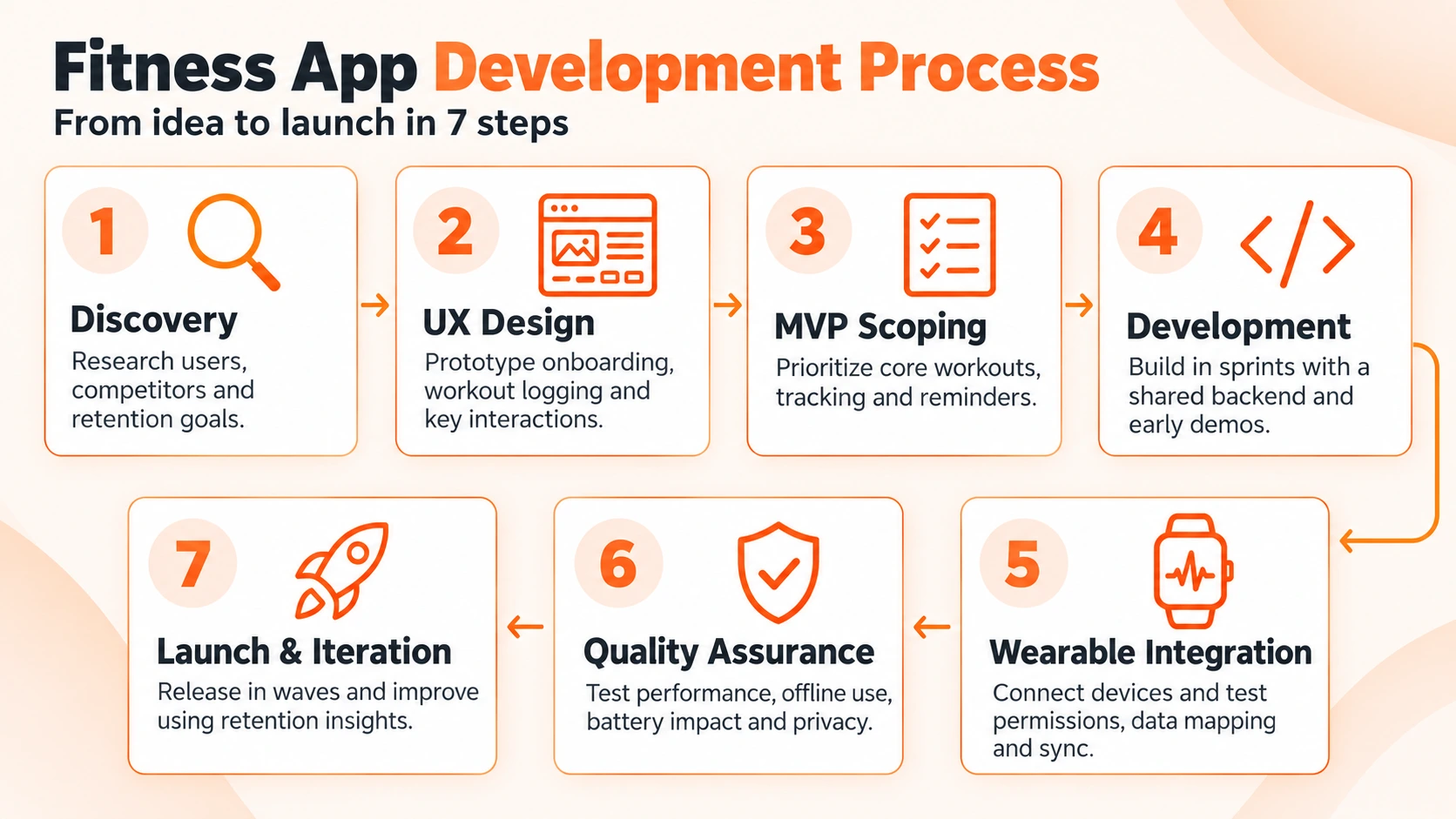
1. Discovery
Then do a little competition research and user research to beta test it before you budget dollars; see what category you are, what your audience is, what your retention goals are.
2. UX Design
Our UI UX design team starts by sketching and prototyping onboarding and logging sequences as our UI UX design team creates habits from raw speed and motivation of the interactions.
3. MVP Scoping
Combine the minimum feature set that will demonstrate retention (e.g., the core workout loop alone, rudimentary tracking, and reminders). All other features require real user data to safeguard first budget dates and sanity.
4. Development
When the target audience mostly consists of Apple users, the engineers proceed with iOS app development in two-week sprints. They develop a common backend and CI pipeline from the beginning. They provide early builds weekly to evaluators. Stakeholders are shown at the end of each sprint.
5. Wearable Integration
Health connect to HealthKit, connect/disconnect devices, set sync intervals, test all mapping data types. Expect to tune multiple times. This is also where Android app development needs to get its act together a little, simply getting to grips with permissions and background sync for the quirks around each manufacturer.
6. Quality Assurance
Casual Testing doesn’t test edge cases (sensor data, battery drain, sync offline, interrupted workouts, etc.). Fitness users crash during a workout, in real time. Specialized QA services cover: device matrices, performance, and privacy review in accordance with the FTC Health Breach Notification Rule.
7. Launch and Iteration
Create listings, privacy disclosures, analytics in stores; launch in waves. Track week 1 and week 4 retention for roadmap inputs.
Compliance and Health Data Handling
Health-monitoring data is governed by different regimes depending on who is managing it. (HHS says the HIPAA Privacy Rule would not apply unless the app is creating or receiving protected health information for or on behalf of a covered entity, such as an insurer or clinic.) Most consumer fitness apps are not covered by HIPAA, but are governed by the FTC, Europe’s GDPR, and state privacy laws.
1. Consent and Permissions
Health information is a special type of consent in the GDPR, for which explicit consents are granted. HealthKit and Health Connect also require permission for each type of data, so only request what you need for each feature. Apple also doesn’t allow HealthKit data usage for advertisements.
2. Data Minimization
Collect only valuable data, encrypt data in transit and at rest, and make it easy for users to export and delete data. Minimization limits the mutability of damage due to breach and builds the trust that hounds vigilance.
Conduct a data flow map before development. Knowing exactly what data you collect, where it’s stored, and who is accessing it makes it easier to respond to user requests and audits. Assign a privacy owner and audit them with each release.
Choosing a Fitness App Development Partner
Seek proof not promises. A fitness mobile app development company should have a transparent effort on compliance and retention analytics, work on wearables integrations, and have products shipped in your space.
Means one team taking care of the results from A to Z—good fitness app development services and strategy, design, engineering, QA, and post-launch support. Ask for references, price quotes for change requests provided by the team, and assurances of continuity. Ask if the team can share analytics dashboards from earlier launches (retention > downloads).
If your product contains nutrition, make sure the partner works with registered dieticians and follows the Dietary Guidelines for Americans, versus devising its own calorie logic. Apply the same scrutiny to qualified personal training instructors.
Consider scope and price control when evaluating proposals. The lowest price may not include integrations and testing, for which you would pay extra. Finally, request a paid “discovery phase.” This will allow you to get a feel for how a team thinks, prices, and communicates before diving into a full-build project.
Concluding Note
Decide a category for your fitness mobile app development, considering budget, features, and platforms when creating your great product. Advanced features like AI coaching and wearables need to help with retention to be worth their weight. Scope decisions are reflected in budgets from $25K to $250K+. A disciplined seven-step process and compliance protect users and timelines. Remember that applications die not because they don’t deliver the functions, but because they don’t engage. Track retention from day one. Start small, experiment with real users, and ramp up when data seems to endorse the decision. Pairing the right partner with a clear scope turns a crowded market into an opportunity.
Frequently Asked Questions
1. How much does it cost to develop a fitness app?
Typical projects will run around MVP 25K-60K, mid-tier 60K-120K, and full-featured 120K-250K+. The cost will vary based on feature set, number of platforms, integrations, and compliance. Before subscribing, get a scoped estimate from a development partner.
2. How long does it take to build a fitness app?
An average MVP takes 3-4 months. Mid-tier builds 5–7 months. Feature-rich offerings with wearables, AI coaching, and multiple platforms take 8–12 months. The key to not running out of a deadline is scope discipline.
3. What features should a fitness app MVP include?
The five core: accounts and authentication, onboarding and goal settings, logging workouts, tracking progress, and notifications. Everything else (wearables, AI coaching, community, nutrition) can wait until retention data proves that the core loop works.
4. Should I build a native app or use cross-platform?
Native builds have the best sensor access and performance: this is important for wearable heavy products. In most cases, React Native and Flutter are cheaper and boast shorter timelines. The choice will come down to the expertise of your team and the degree of device integration you require.
5. Do I need HIPAA compliance for my fitness app?
Only if your app creates or processes protected health information on behalf of covered entities (e.g., clinics or insurers). Most consumer fitness apps are not covered by HIPAA; however, FTC rules (as well as GDPR in Europe and some state privacy laws) do. Speak with your attorney.
Give Your Users a Reason to Return